Pillarworks. Pillar 2 platform · by L+C Technology

Pillar 2, run in-house. Traceable through to the GIR XML.

Developed from hands-on Pillar 2 implementation – Pillarworks takes your tax department through the entire process to the finished GIR file in the authority’s format, checked before download.

Request a demo Watch the film

Developed by Pillar 2 practitioners at LOHR+COMPANY GmbH WirtschaftsprüfungsgesellschaftFor groups with revenue of €750 million or more

Application view from Pillarworks · demo group · fictional values
  1. Three languagesThe interface in German, English or Swedish.
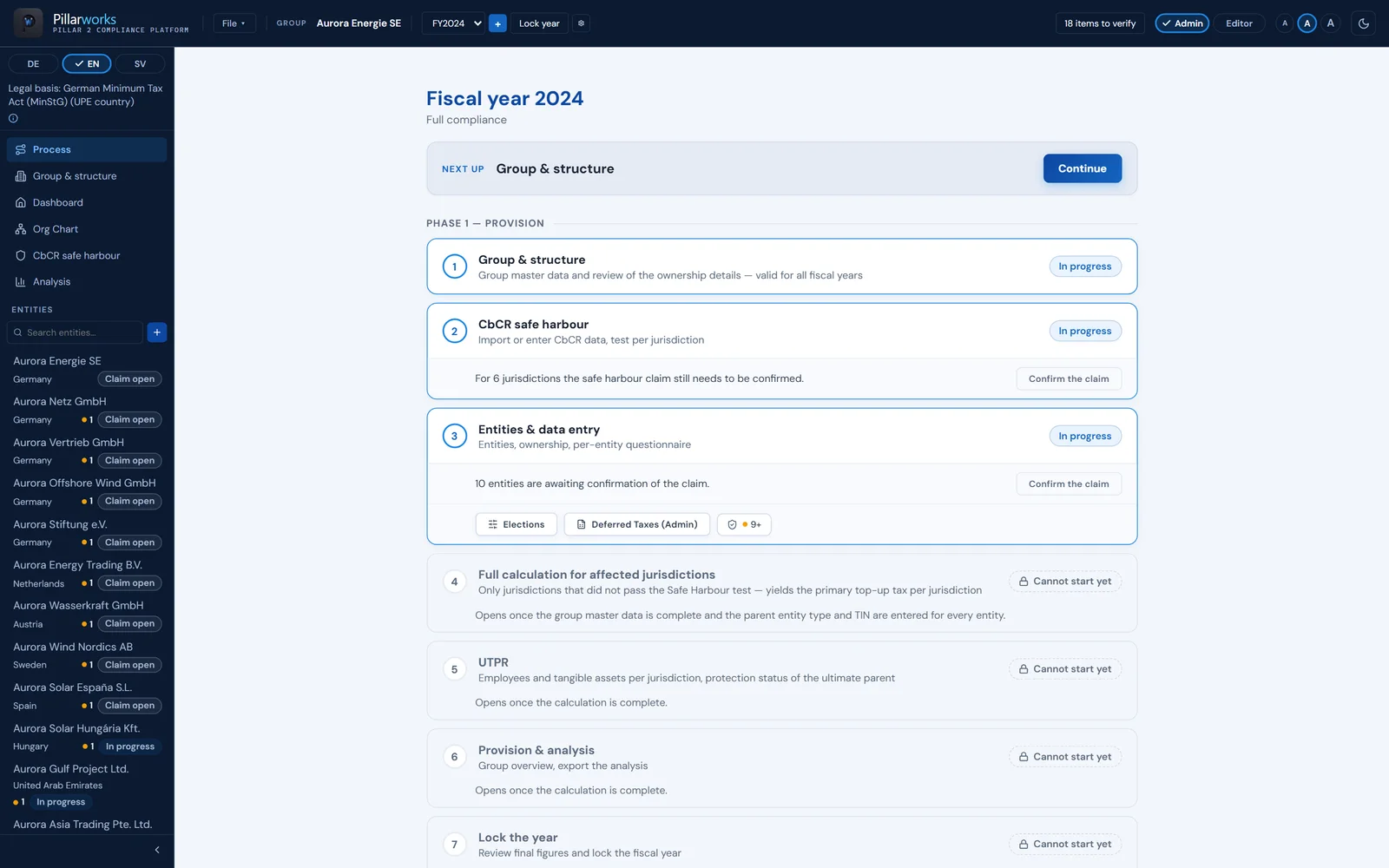
  2. Phase 1 – ProvisionThe process guides you through the phase step by step.
  3. CbCR safe harbourThree tests per jurisdiction; the claim is confirmed per jurisdiction and year.
  4. Lock the yearThe provision computation is retained as evidence.

For the head of tax

One process, one data set. No integration project.

  • 01In-houseYour tax department runs Pillar 2 itself – from the country report to the finished GIR XML file.
  • 02TraceableCalculation steps and the reference to the OECD rule and local law sit at the result; the locked year stays on record.
  • 03Captured onceProvision for the consolidated accounts and minimum tax report from the same data.
  • 04No integration projectNo ERP integration: Pillarworks works with the data your tax department already has.

From hands-on practiceOur founders have implemented Pillar 2 several times across the entire process at LOHR+COMPANY GmbH Wirtschaftsprüfungsgesellschaft – from the scoping analysis to filing the GloBE Information Return with the German Federal Central Tax Office. Pillarworks follows this path, through to the finished GIR XML file.

Needs
group structure – set up or imported from a GIRcountry reports as Excel template, XML or entered manuallyentity dataa browser
Does not need
no ERP connectorno integration projectno advisory engagement
Pillarworks in brief

Pillarworks is the Pillar 2 platform by L+C Technology GmbH (Düsseldorf) for group tax departments: group structure and country-by-country reports captured once, CbCR safe harbour tests per jurisdiction, provision and full calculation, and the GloBE Information Return as GIR XML following the OECD specification, checked before export, with country profiles for Germany, Sweden, Austria and the Netherlands – without ERP integration, with LuCy as its AI assistant.

One data set · Three results

Captured once. Provision, report and analysis.

Group structure, country-by-country reports and entity data go in once. Pillarworks checks, computes and delivers three results – without connecting to your ERP.

Input

Pillarworks

Result

  • 01 Group structure Entities, ownership, special cases – set up or imported from an existing GIR Group & structureImport from GIR filing
  • 02 Country-by-country reports per year, one source for the safe harbour tests and the GIR Excel templateXMLmanual
  • 03 Entity data guided data collection per entity, help at every field Data collection
Pillarworks.
  1. CbCR safe harbourthree tests per jurisdiction
  2. Full calculation for affected jurisdictionsper jurisdiction and entity
  3. Plausibility checkrequired corrections, open decisions and items to verify

One set of data

  • 01 Provision for the consolidated accounts, per parent entity and jurisdiction, before and after safe harbour Phase 1
  • 02 Minimum tax report GIR XML following the OECD specification, checked before export DESEATNL
  • 03 Reports and analysis overview, world map, by jurisdiction and safe harbour; Excel analyses ExcelPDF
Result GIR XML · in the authority’s format Following the OECD specification in the authority’s profile – BZSt, BMF (FinanzOnline), Skatteverket, Belastingdienst. Produced only once the check against mandatory fields and validation rules passes without errors. Your group submits it to the authority.
Data flow in Pillarworks · schematic

Feature map

Ten modules. One computation.

Choose a module: you see the real application view and what the module does – named as in the application.

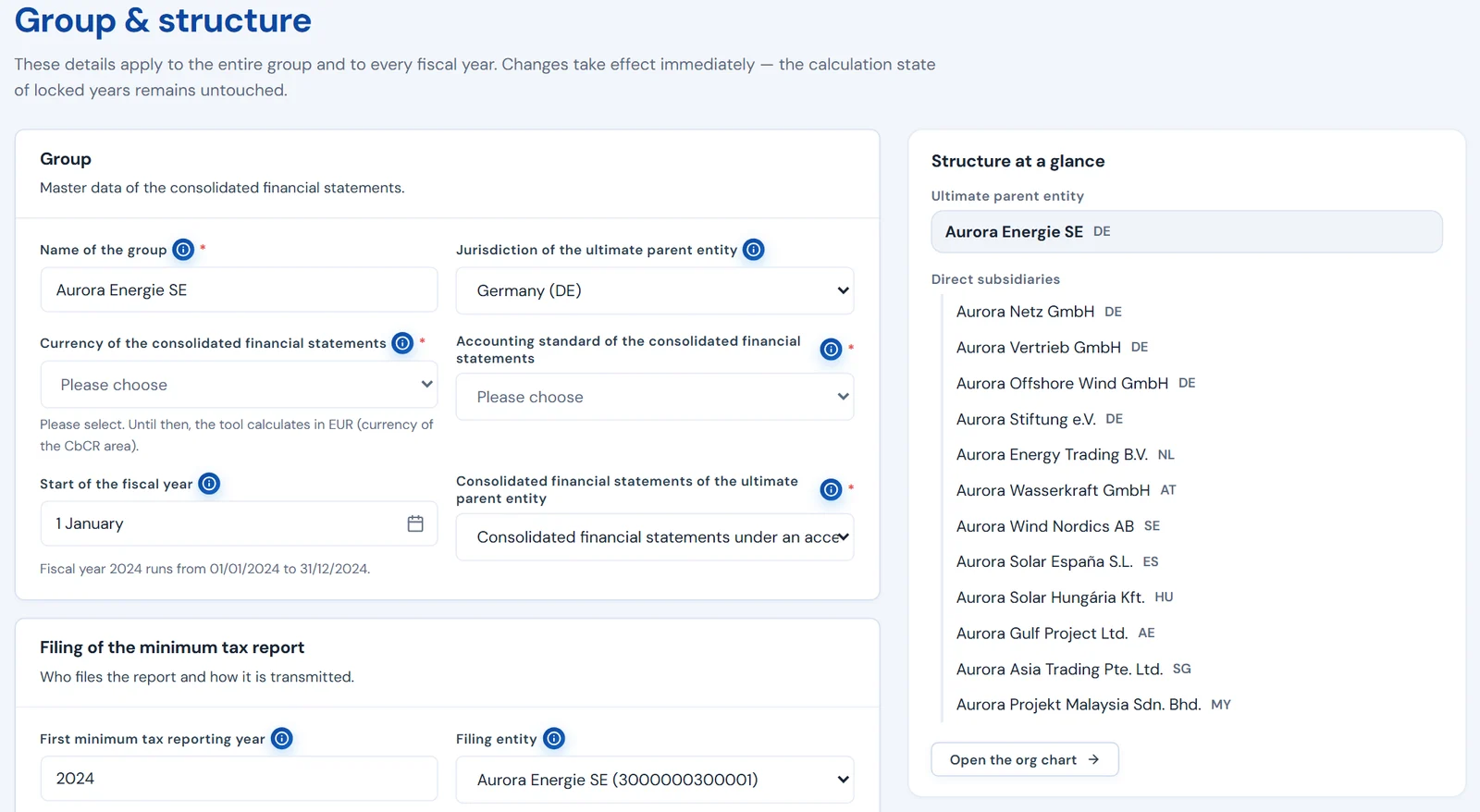
Group & structure · excerpt · fictional values

01 / 10

Group & structure

Entities, ownership interests and special cases as the basis of every computation. The org chart is drawn automatically from the recorded ownership interests – zoom, fit to screen, export as PDF.

In the application

  • Group & structure
  • Org Chart
In detail
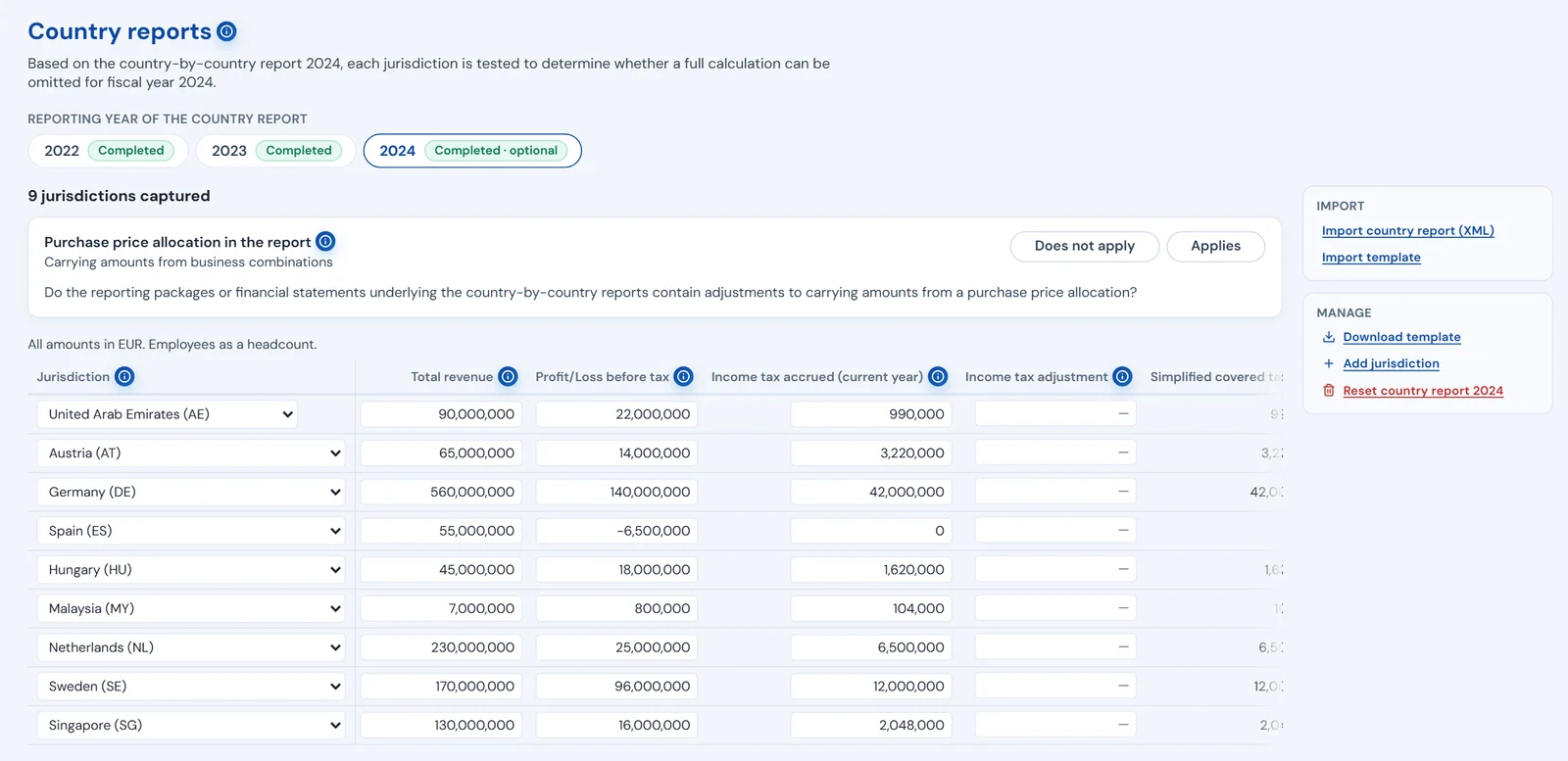
Country reports · excerpt · fictional values

02 / 10

Country reports

Country-by-country reports via Excel template, as XML or entered manually – per year, one source for the safe harbour tests and the GIR. The German formats and the OECD format of the country-by-country report are supported.

In the application

  • Excel template
  • Import country report (XML)
In detail
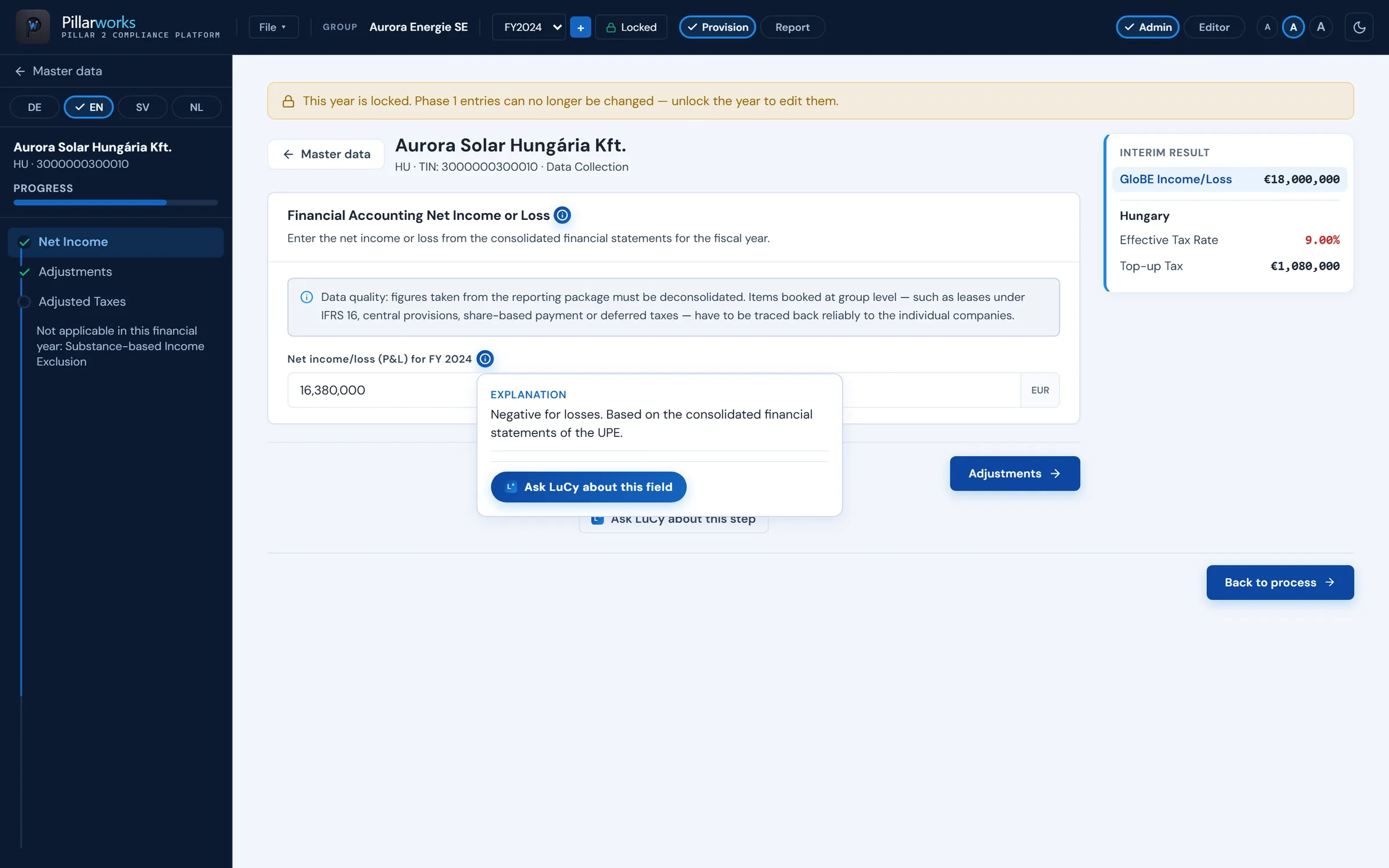
Data collection with field help · excerpt · fictional values

03 / 10

Data Collection

Guided data collection per entity, help at every field. With “Safe harbour first”, no full calculation is needed where a jurisdiction passes the safe harbour test and the relief is claimed.

In the application

  • Data Collection
  • Entities & data entry
In detail
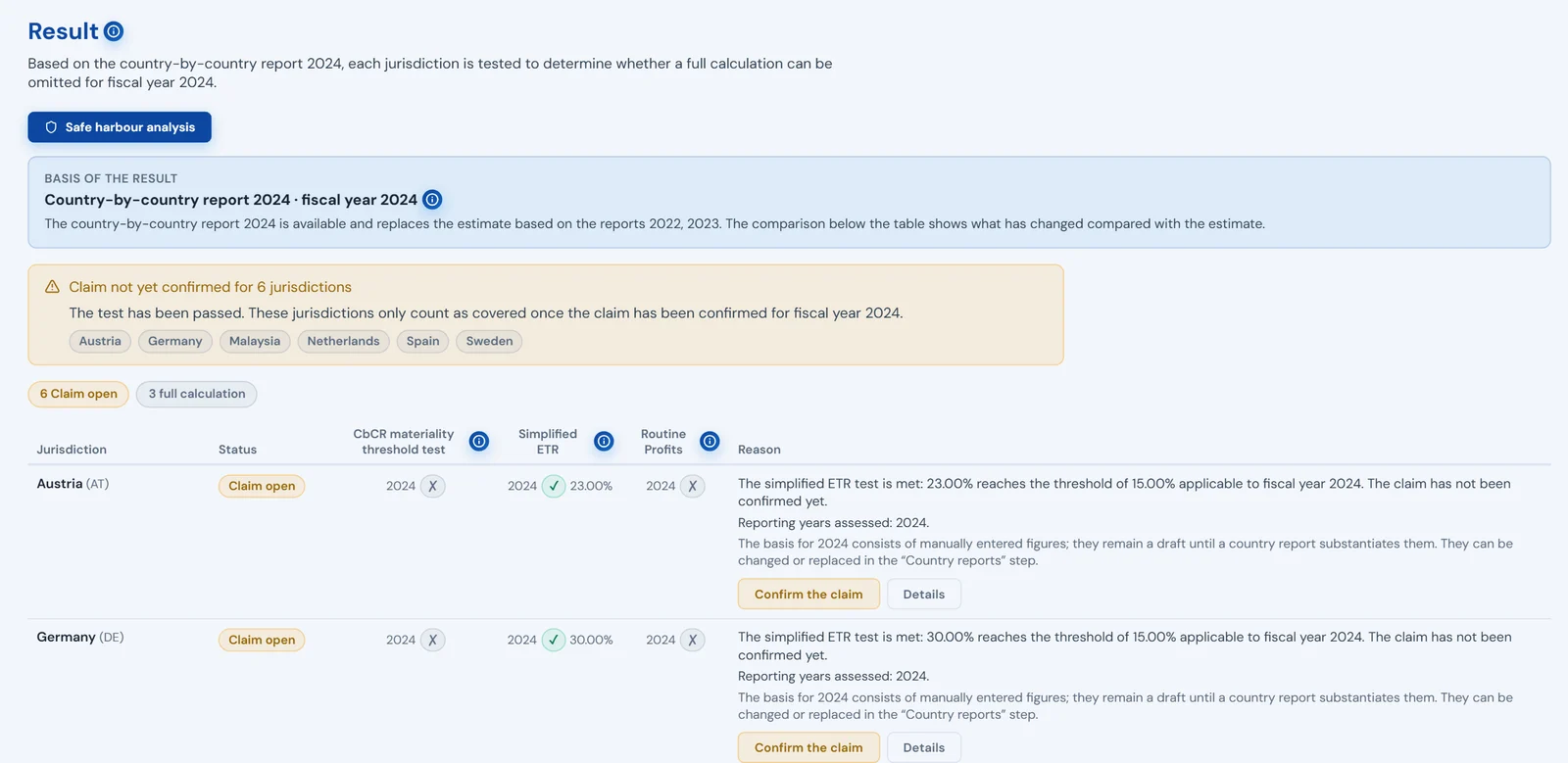
CbCR safe harbour · result · excerpt · fictional values

04 / 10

CbCR safe harbour

Three tests per jurisdiction: de minimis, simplified ETR, routine profits. Result per jurisdiction: covered or full calculation required. Whether the relief is claimed is recorded per jurisdiction and year.

In the application

  • CbCR safe harbour
  • Confirm the claim
In detail

Calculation steps · one jurisdiction

  1. 1 GloBE income €100.0m Art. 3
  2. 2 Covered taxes €12.0m Art. 4
  3. 3 Effective tax rate2 ÷ 1 12.00% Art. 5.1
  4. 4 Top-up tax percentage15% − 3 3.00% Art. 5.2.1
  5. 5 Substance-based income exclusion €10.0m Art. 5.3
  6. 6 Top-up tax4 × (1 − 5) €2.7m Art. 5.2.3

Reference: OECD Model Rules

Calculation steps per jurisdiction · schematic · example · fictional values

05 / 10

Computation

GloBE computation per jurisdiction and entity, with calculation steps and rule references at the result. Tax groups, partnerships and flow-through entities are covered in the computation.

In the application

  • Full calculation for affected jurisdictions
In detail
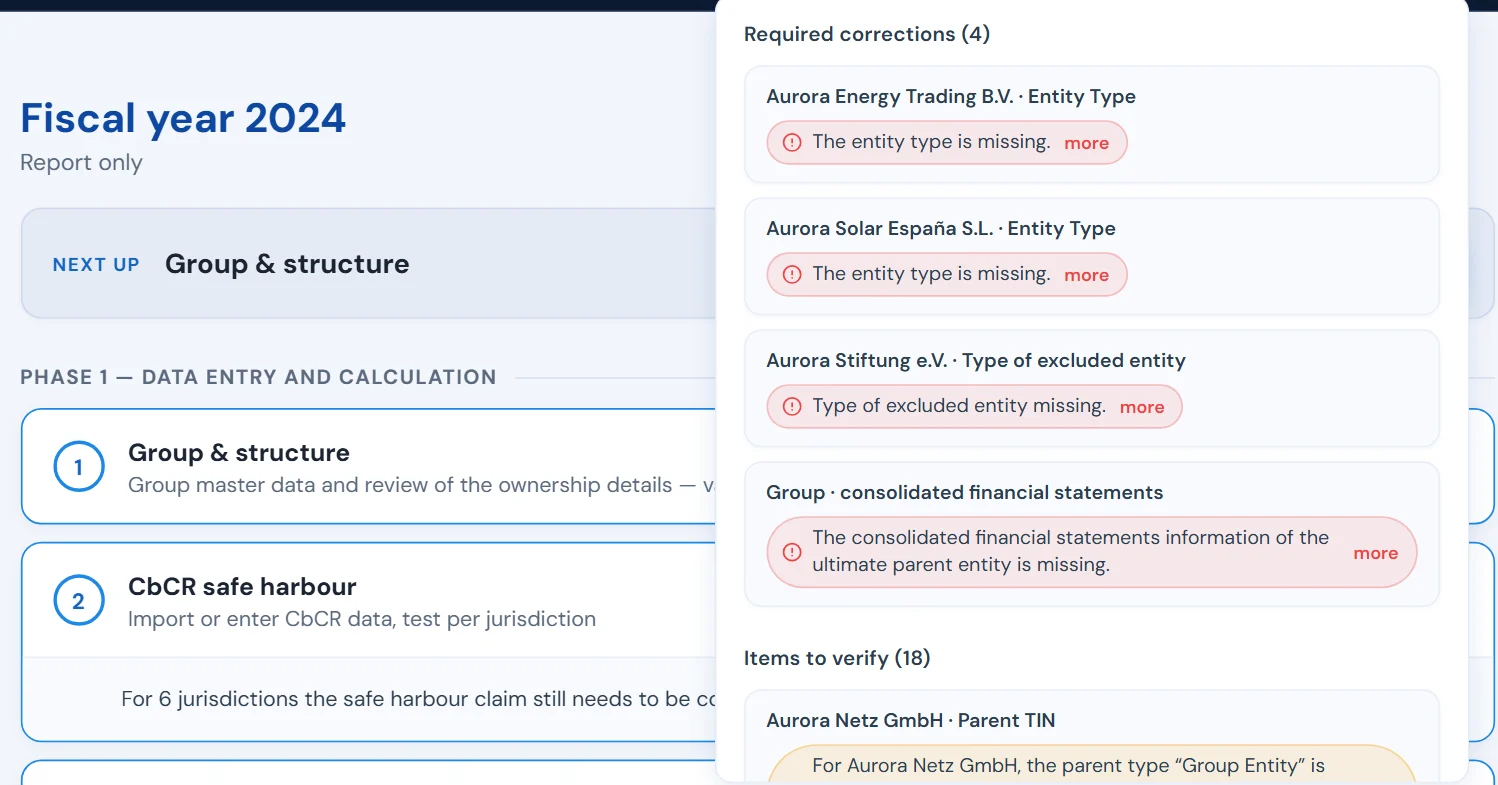
Plausibility check · excerpt · fictional values

06 / 10

Plausibility check

Field, cross-field and group-level checks across all entered data. Required corrections and items to verify, kept apart; every finding leads to the affected field.

In the application

  • Plausibility check
  • Required corrections
  • Items to verify
In detail
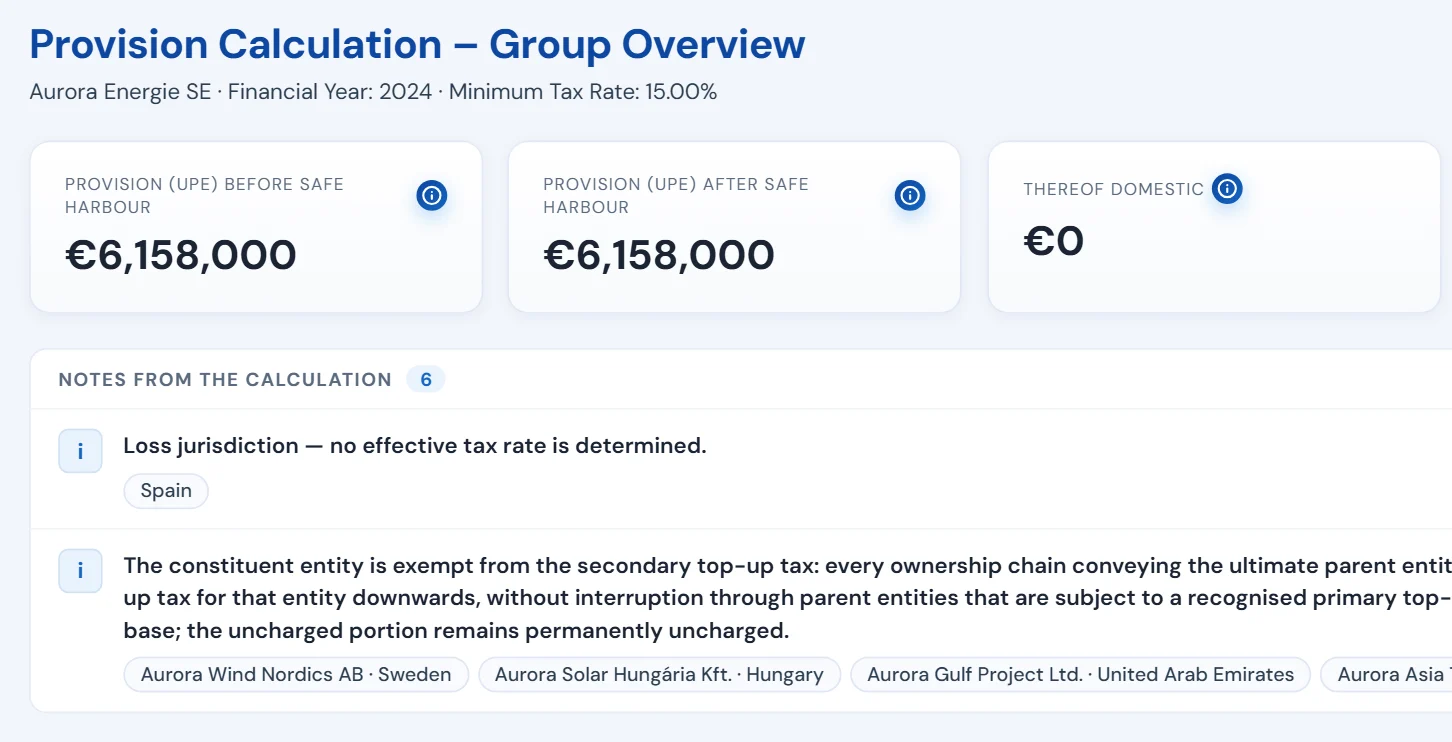
Provision calculation · excerpt · fictional values

07 / 10

Provision

Top-up tax provision for the consolidated accounts, per parent entity and jurisdiction, before and after safe harbour.

In the application

  • Provision & analysis
In detail

Country profiles

Germany
Legal basis and report
Sweden
Legal basis and report
Austria
Legal basis and report
Netherlands
Legal basis and report

No XML file unless the report passes validation.

08 / 10

GIR

The GloBE Information Return as XML following the OECD specification, from the same data as the computation and the tests. The XML file is only produced once the report passes validation without errors. If errors remain, Pillarworks produces the list of open items instead of a file.

In the application

  • Create & review GIR
  • Generate GIR XML
In detail
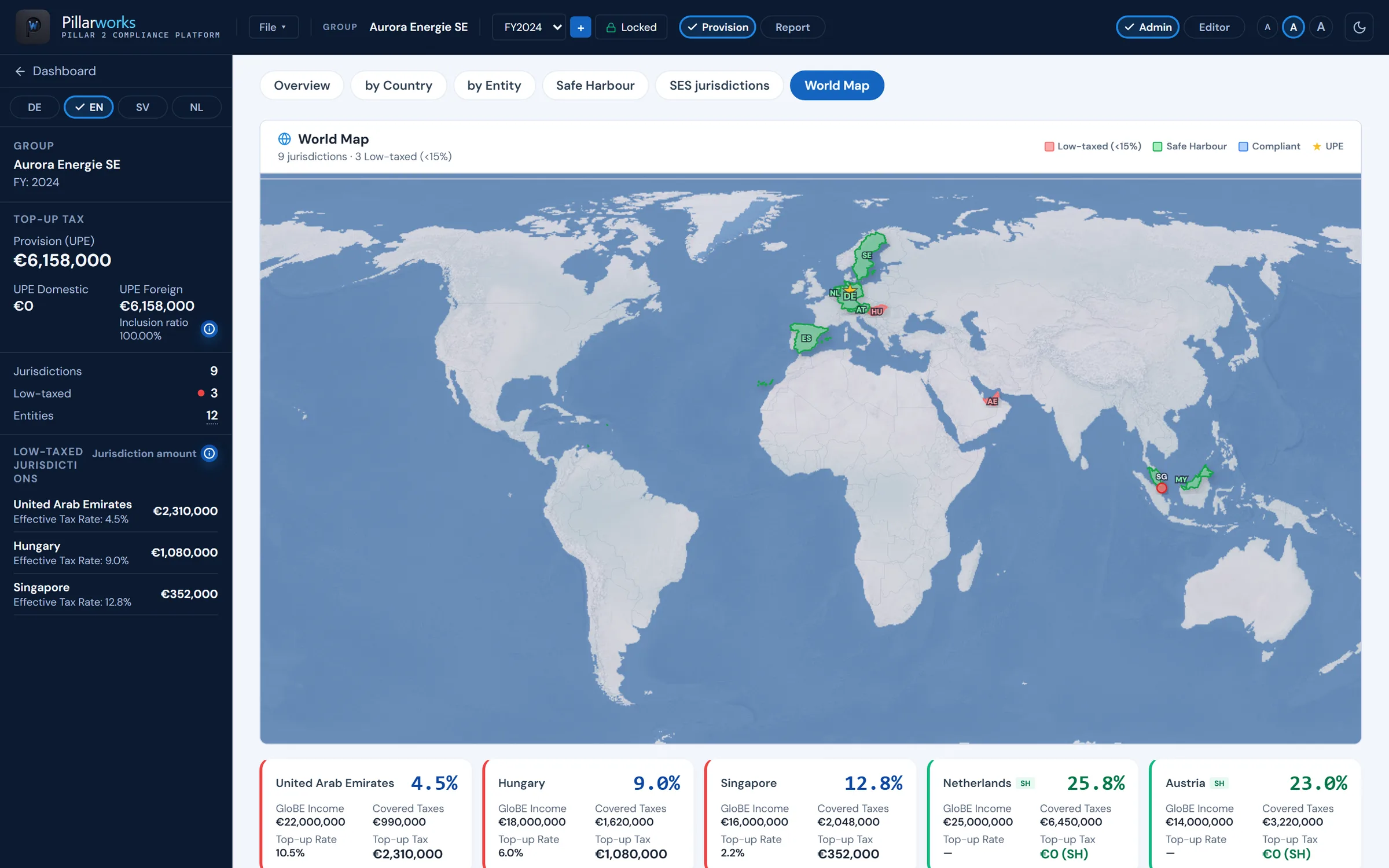
Analysis · world map · excerpt · fictional values

09 / 10

Analysis

Overview, world map, by jurisdiction and safe harbour. Excel analyses with the calculation per jurisdiction and per entity, CbCR and safe harbour exports.

In the application

  • Analysis
  • World Map
  • Export calculation documentation
In detail

LuCy · separate module

Field help
at every input field
Knowledge base
expert-maintained, not the open internet
Role
software help, not tax advice

10 / 10

LuCy

The built-in AI assistant: at every input field LuCy explains what belongs there – based on an expert-maintained Pillar 2 knowledge base. Software help, not tax advice.

In the application

  • Ask LuCy about this field
In detail

Country profiles

Four country profiles. Germany, Sweden, Austria, the Netherlands.

The calculation steps refer to the OECD rules and the respective law; the GIR XML follows the authority’s profile.

Europe as a dot grid: Germany, Sweden, Austria and the Netherlands light up Schematic map. Highlighted are the four countries for which Pillarworks covers legal basis and report.
  1. Germany German Minimum Tax Act Profile of the BZSt (DIP)
  2. Sweden Swedish law Skatteverket · OECD format with message header requirements
  3. Austria Austrian Minimum Taxation Act Profile of the BMF (FinanzOnline)
  4. Netherlands Dutch Minimum Tax Act Belastingdienst · OECD format with message header requirements

No XML file unless the report passes validation – in every profile.

Country profiles · schematic
LuCy

LuCy · Pillar 2 assistant

Help at the field. With clear limits.

LuCy is the built-in AI assistant of Pillarworks. We describe what it does – and what it does not do.

What LuCy does

  • Explains every input fieldAt every input field LuCy explains what belongs there.
  • Answers from a knowledge baseBased on an expert-maintained Pillar 2 knowledge base, not the open internet.
  • Right at the fieldThe entry point “Ask LuCy about this field” sits at every input field.

What LuCy does not do

  • No tax adviceLuCy is software help. Tax advice remains advice.
  • No decisions on your behalfJudgements, elections and the review of results stay with your team.
  • Not mandatoryLuCy is a separate, optional module of the platform.

LuCy is software help for questions on the rules and on using the platform – not tax advice.

Separate, optional moduleBefore go-live, we disclose which data LuCy processes and where.

Clear roles

Software by L+C Technology. Advice from LOHR+COMPANY, if you want it.

We develop software. Tax advice is provided on request by the expert team of LOHR+COMPANY GmbH Wirtschaftsprüfungsgesellschaft.

You use Pillarworks on your own. On request, the Pillar 2 team of LOHR+COMPANY GmbH Wirtschaftsprüfungsgesellschaft reviews your results before filing and advises on further tax questions – always under a separate engagement that you enter into directly with them. Neither requires the other.

  • Process Getting started in four steps and a year in three phases – provision, report & return, submission. How Pillarworks works
  • Security Application servers and database in Frankfurt am Main – as a written commitment before you sign. Group structure, computations and reports exportable as Excel, GIR XML and project file. All answers for your legal department
  • Film Pillarworks in motion: set up the group, import the GIR, provision and analysis, next year. Film on the home page

Demo

See Pillarworks using the fictional group Aurora Energie SE.

What you see in the demo

  1. 01Set up the group and import the country-by-country reports
  2. 02Safe harbour tests per jurisdiction with a plain-language result
  3. 03Provision for the close, full calculation where no safe harbour applies
  4. 04Plausibility checks and GIR creation in the authority’s profile
  5. 05Analysis with world map and Excel export

One hour with one of the founders. Afterwards we discuss scope and access for your team.

  • One hour, online, using the fictional group Aurora Energie SE – your own structure guides the conversation, it is not the data we work with.
  • You send us nothing and prepare nothing.
  • One of the founders walks you through the tool and answers your questions directly.

Request a demo

or write to us directly:info@lctechnology.de+49 211 16451‑100